Alexa Python Development: Build And Deploy An Alexa Skill
Smart home speakers were a novel idea just a couple of years ago. Today, they’ve become a central part of many people’s homes and offices and their adoption is only expected to grow. Among the most popular of these devices are those controlled by Amazon Alexa. In this tutorial, you’ll become an Alexa Python developer by deploying your own Alexa skill, an application that users will interact with using voice commands to Amazon Alexa devices.
In this tutorial, you’ll learn:
- What the main components of an Alexa skill are
- How to set up an Alexa skill and create Intents
- What the
ask_sdk_coreAlexa Python package is - How to use
ask_sdk_coreto create the business logic of your Alexa Python skill - How to build, deploy, and test your Alexa Python skill using the online developer console
Get Your Code: Click here to download the free sample code that shows you how to build and deploy a Joke Bot Alexa skill with Python.
Getting Started With Alexa Python Development
To follow this tutorial, you’ll need to make a free Alexa developer account. On that page, you’ll take the following steps:
- Click the Get Started button.
- Click the Sign-Up button on the subsequent page.
- Click Create your Amazon Account.
- Fill out the form with the required details.
- Click Submit to complete the sign-up process.
You’ll also need to be familiar with concepts such as lists and dictionaries in Python, as well as JavaScript Object Notation (JSON). If you’re new to JSON, then check out Working With JSON Data in Python.
Let’s get started!
Understanding Alexa Skills
An Alexa Python developer must be familiar with a number of different Alexa skill components, but the two most important components are the interface and the service:
- The skill interface processes the user’s speech inputs and maps it to an intent.
- The skill service contains all the business logic that determines the response for a given user input and returns it as a JSON object.
The skill interface will be the frontend of your Alexa skill. This is where you’ll define the intents and the invocation phrases that will perform a certain function. Essentially, this is the part of the skill that’s responsible for interacting with the users.
The skill service will be the backend of your Alexa skill. When a specific intent is triggered by the user, it will send that information as a request to the skill service. This will contain the business logic to be returned along with valuable information to the frontend, which will finally be relayed back to the user.
Setting Up Your Environment
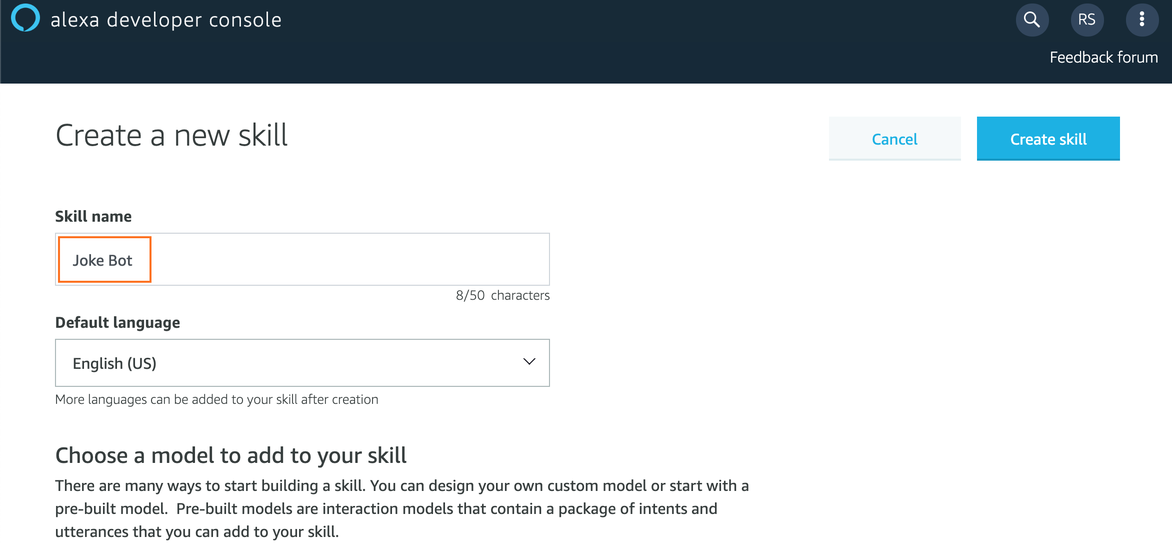
It’s time to start building your first Alexa Python skill! Sign in to the Alexa developer console and click on the Create Skill button to get started. On the next page, enter the Skill name, which will be Joke Bot:
This will be the invocation phrase of your skill. It’s the phrase a user will speak to start using your Alexa skill. You can change this to something else later on if you’d like. Also, note that Alexa skills can interact in many languages, which you can see from the Default Language dropdown menu. For now, just set it to English (US).
Next, you’ll need to choose a model to add to your skill. These models are like templates that have been pre-designed by the Amazon team to help you get started with Alexa Python development, based on some common use cases. For this tutorial, you should select the Custom model.
Finally, you need to select a method to host the backend of your Alexa skill. This service will contain the business logic of your application.
Note: If you select the Provision your own option, then you’ll have to host your own backend for your Alexa Python projects. This can be an API built and hosted on a platform of your choice. The other option is to create a separate AWS Lambda function and link it to your Alexa skill. You can learn more about AWS Lambda pricing on their pricing page.
For now, select Alexa-Hosted (Python) as the backend for your Alexa skill. This will automatically provide you with a free hosted backend, within Alexa’s usage limits, so you don’t have to pay anything up front or set up a complicated backend right now.
Finally, click the Create Skill button to proceed. You might be asked to fill out a CAPTCHA here, so complete that as well. After a minute or so, you should be redirected to the Build section of the developer console.
Understanding the Alexa Skill Model
Once you’ve logged into the Alexa developer console and selected or created a skill, you’ll be greeted with the Build section. This section provides you with a lot of options and controls to set up the interaction model of the skill. The components of this interaction model allow you to define how the users will interact with your skill. These properties can be accessed through the left-side panel, which looks something like this:
Read the full article at https://realpython.com/alexa-python-skill/ »
[ Improve Your Python With ???? Python Tricks ???? – Get a short & sweet Python Trick delivered to your inbox every couple of days. >> Click here to learn more and see examples ]
Popular Products
-
 Classic Oversized Teddy Bear
$23.78 -
 Gem's Ballet Natural Garnet Gemstone ...
$171.56$85.78 -
 Butt Lifting Body Shaper Shorts
$95.56$47.78 -
 Slimming Waist Trainer & Thigh Trimmer
$67.56$33.78 -
 Realistic Fake Poop Prank Toys
$99.56$49.78