Routing Screen Real Estate: Your Agent Workspace Is The Next Routing Decision
You Route Contacts with Precision. Why Not Screen Space?
Before an agent ever sees their workspace, your routing engine evaluates multiple attributes to select an agent: skills, proficiency, queue priority, availability, routing profile, contact attributes, and business rules. It makes a calculated decision about who handles each interaction.
The workspace itself? Typically, one size fits all. Same user interface (UI), same applications, every contact.
Every minute an agent spends searching across tabs, applications, and knowledge sources is a minute not spent helping a customer. This is more than a user experience (UX) problem. It is an operational cost: at scale, this can add up to thousands of agent-hours each month spent navigating screens instead of solving customer problems.
Your routing system applies considerable intelligence to decide who handles a contact, but then it leaves your agents to find the right information and tools on their desktop to resolve the customer’s issue.
Contact centers route three scarce resources: agent time, agent attention, and screen space. Most organizations have invested decades in optimizing the first two through routing engines, workforce management, and training programs. Screen space, the third resource, has been left static: agents have one size fits all experiences, regardless of the contact. It should be allocated with the same intentionality as a routing decision. With Amazon Connect Customer, you can now do exactly that.
This is more than a workspace redesign. It is an extension of your routing architecture into the visual layer. The routing profile that determines which agents handle which contacts now also determines what those agents see. The layout adapts based on what arrives.
A Different Mental Model
Traditionally, agent workspaces are designed once and then deployed. Conditional widgets or visibility rules can help, but the fundamental unit often remains a static layout that an administrator maintains for each permutation.
Amazon Connect Customer takes a different approach. You assign a workspace to a routing profile and select the Modern layout. The system handles per-channel adaptation automatically: when a voice contact arrives, the workspace foregrounds real-time controls; when a chat arrives, it foregrounds conversation flow. You don’t need a custom configuration for each scenario.
The workspace becomes a routing surface, tied to the same routing profile that governs contact distribution.
Announcing Flexible Layouts for the Amazon Connect Customer Agent Workspace
Today, Amazon Web Services (AWS) announces flexible layouts for the Amazon Connect Customer agent workspace. With this capability, you can make the agent workspace adaptive, addressing three common challenges facing modern contact centers:
Cognitive load: Agents navigate between applications during interactions, losing time to tab switching, scrolling, and hunting for buried information.
Maintenance burden: Without adaptive layouts, administrators build and maintain custom workspaces for each permutation of role, channel, and use case.
Channel mismatch: Voice, chat, email, and tasks each demand different tools in different proportions, yet many workspaces offer a single static arrangement.
With these new layouts, you can assign different layouts to different groups of agents by routing profile, and the layout updates automatically based on the channel. For example, voice contacts surface softphone controls and real-time guidance. Chat, email, and task contacts get a taller, wider conversation pane for agents to read and respond in.
The workspace responds to the work.
We think of it as routing screen real estate: allocating visual attention with the same deliberate care you apply to routing contacts.
What This Looks Like in Practice: A Day in the Life
Meet John Doe, an agent on AnyCompany Bank’s retail banking support team handling voice, chat, task, and email contacts daily. His routing profile is configured for concurrent contacts across channels, a concurrency model his supervisors designed based on team capacity and compliance requirements.
John logs in to the Connect Customer agent workspace.
Voice contact arrives:
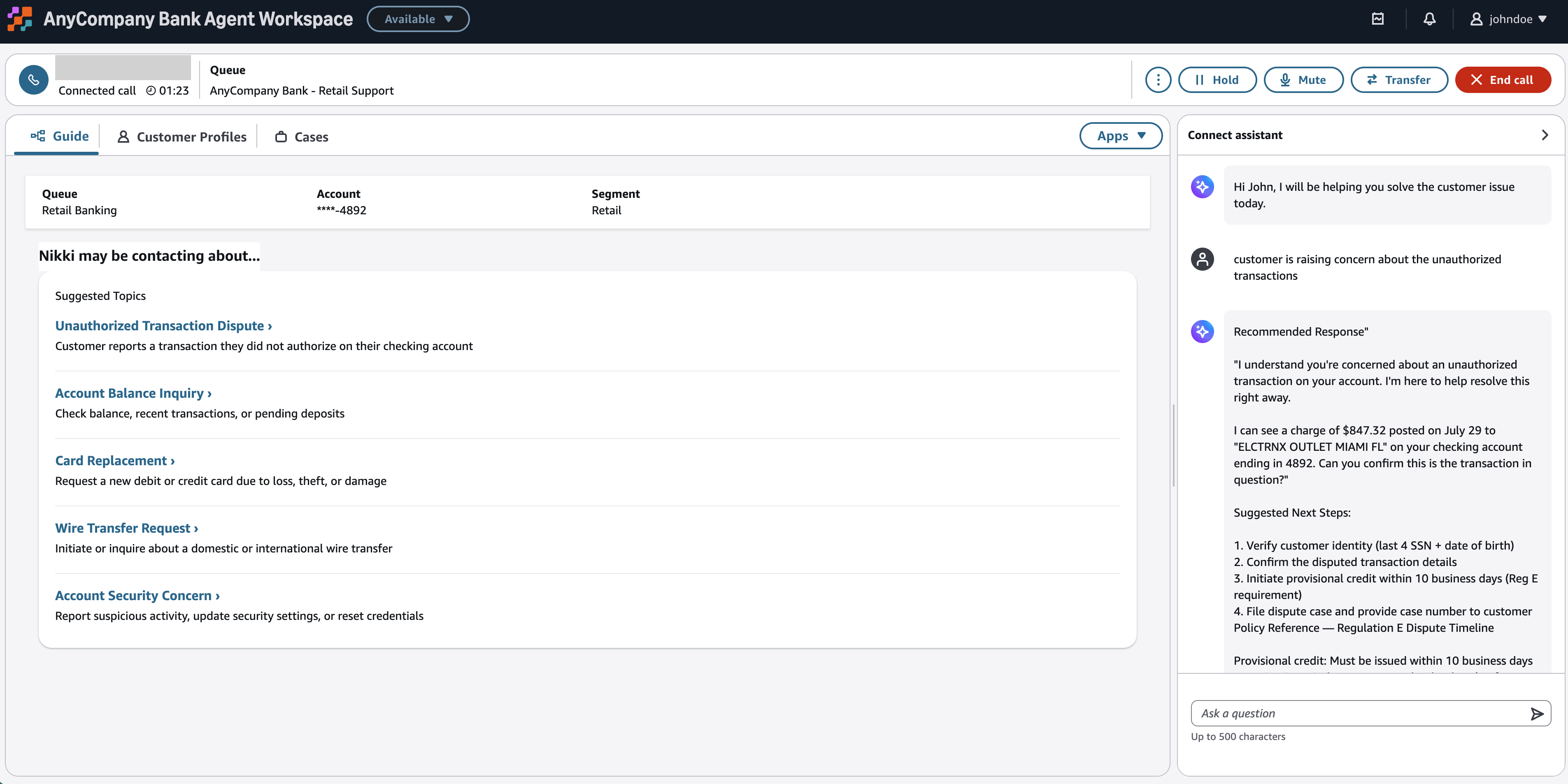
Customer Nikki Wolf is disputing an unauthorized transaction on their checking account. The workspace adapts: the softphone control bar moves to the top of the workspace, giving more real estate for viewing customer profiles, step-by-step guides, and case details. The Connect Customer AI assistance panel expands to provide real-time assistance and a recommended talk track for transaction disputes. Transfer options to the fraud and disputes team are accessible through the softphone control bar. The most frequently accessed controls are available in the control bar so John can quickly resolve customer needs.
Figure 1: Voice contact rendered in modern layout of agent workspace
While still on a voice contact, a chat arrives:
Mateo Jackson initiated a chat about their mortgage application status. John handles both contacts simultaneously, switching between them without leaving the workspace.
The voice contact retains its layout. For the chat contact, the conversation pane expands to claim primary real estate, providing a comprehensive view of the thread. Connect Customer AI assistance provides channel-specific recommendations. Customer profile and case details remain accessible for quick reference. John is not toggling between two identical workspaces. He is toggling between two differently optimized workspaces, because each channel demands a different allocation of screen real estate.
Figure 2: Voice and chat contact rendered in modern layout of agent workspace
Chat is resolved; a task arrives while voice continues:
John closes the chat. A task arrives for a wire transfer approval. The workspace shifts: structured forms become the focal point. Connect Customer AI assistance surfaces knowledge articles about the wire transfer compliance policy. No conversation pane, no chat history. The voice contact continues in the background. The layout prioritizes structured work completion because that is what tasks demand.
Figure 3: Voice and task contact rendered in modern layout of agent workspace
All clear; an email arrives:
John completes the task and resolves the voice contact. An email arrives on an open account maintenance case. The workspace reclaims all available real estate for a single contact. The contact list panel disappears automatically. The compose and reply pane expands with templates accessible inline.
Figure 4: Email contact rendered in modern layout of agent workspace
John handled contacts across four channels in one morning, sometimes concurrently. For each contact, the workspace foregrounded the tools that channel type demands. He did not switch windows, rearrange panels, or configure anything. The new workspace layout made those decisions based on channel type every time a contact arrived.
Why This Matters Operationally
Simplified administration. Assign a workspace to all your users, to individual named users, or by routing profile. The system composes the right surface from the new workspace layout’s built-in adaptation logic.
Many enterprises built custom agent desktops before the agent workspace existed. Maintaining and extending those builds requires ongoing development effort. They need the flexibility to match their existing agent experience without maintaining a custom build.
Automatic support as you add channels. When you add email support or enable a new contact type, the workspace adapts without a redesign cycle.
Routing and workspace in lockstep. When you change how contacts are routed, workspace assignments move with them. Routing and workspace are no longer separate configuration surfaces you must keep in sync manually.
Governance by design. Workspace assignments are scoped to routing profiles, so your existing routing governance model extends naturally. The team that owns routing profile configuration also governs workspace allocation. Changes do not affect agents mid-interaction; the updated layout applies to the next contact that arrives.
The Mental Model Shift
Stop thinking: “What should my workspace look like?”
Start thinking: “What does each type of work need the agent to see?”
The system handles the rest.
Built on the Connect Customer Views Framework
Flexible layouts are built on the same building blocks you already use to customize the agent workspace.
We built these layouts by using components, the Amazon Connect Customer views framework, and the UI builder. The architecture is built on a principle: the workspace should surface what the agent needs for the type of work in front of them.
How It Works: Configuring Flexible Layouts
The following walkthrough shows how to configure flexible layouts in your Connect Customer instance.
How the Adaptation Works
The adaptation has two parts: how you configure it, and the sequence that runs when a contact arrives.
The Mechanism: How you Configure it
- You assign a workspace to a routing profile or user. This is the routing decision: for every agent assigned to this routing profile, use this workspace.
- The workspace uses the Modern layout, which contains built-in adaptation logic that responds to channel type automatically.
- When a contact arrives, the Modern layout evaluates the channel type (voice, chat, task, or email) and renders the appropriate layout. No additional rules, flow blocks, or API calls are required.
The Sequence: What Happens When a Contact Arrives
When a contact arrives, the agent’s routing profile determines the workspace the Modern layout detects the channel type, and the layout adapts automatically. Each channel type foregrounds different tools:
- Voice: softphone control bar at the top, AI guidance panel, quick connects
- Chat: conversation pane primary, customer profile sidebar
- Task: structured forms, knowledge articles
- Email: compose pane, templates inline
Prerequisites
- An AWS account
- An Amazon Connect Customer instance
- A security profile with permissions to manage workspaces and routing profiles
Step 1: Navigate to Workspace Configuration
- Sign in to the Amazon Connect Customer admin website.
- In the navigation pane, choose UI Management, and then choose Workspaces.
Figure 5: Amazon Connect Customer workspace management page
Step 2: Create a Modern Workspace
- Choose Add new workspace.
- For Name, Title, and Description, enter values. Name is required; the other fields are optional.
- Choose Save.
Figure 6: Adding new workspace for AnyCompany Bank
Step 3: Add a Page to the Workspace
- Open the workspace and go to the Pages section.
- Choose Add page, and then choose Use existing Connect page.
- For Page, choose Agent Workspace.
- For Page layout, choose Agent Workspace – Modern.
- For View version, choose the latest version, and then choose Save.
The Modern layout is more than a visual refresh. It contains the adaptation logic that responds to channel type. By selecting it, you enable automatic layout adaptation for every contact that reaches agents using this workspace.
Figure 7: Adding modern layout to AnyCompany Bank Workspace
Step 4: Assign the Workspace to Users or Routing Profiles
- Choose your workspace, and then go to the Assignments section.
- For scope, choose All users or Assigned users.
- Choose Add assignments.
- Assign the workspace by using one of the following:
-
- Individual users: for targeted rollouts or specialized agents
- Routing profile: for systemic allocation at scale
When you assign a workspace to a routing profile, you are telling the system: for every agent assigned to this profile, use this workspace and its built-in adaptation logic.
Figure 8: Adding workspace assignments based on routing profile
Step 5: Verify Channel-Specific Behavior
Route test contacts through each channel type (voice, chat, task, and email) to the same agent. Observe the workspace adapting per contact.
There’s no separate deployment step. The workspace adapted because you made a routing decision and the Modern layout handled the rest.
Clean up
To avoid ongoing charges, remove the resources you created for testing. Test contacts across voice, chat, email, and tasks incur standard Amazon Connect Customer usage charges, and claimed phone numbers incur daily charges until you release them.
Step 1: Remove workspace assignments
- In the navigation pane, choose UI Management, and then choose Workspaces
- Choose your workspace, and then go to the Assignments section
- Remove the routing profile and any individual user assignments, or set visibility to Visible to no users
Step 2: Delete the workspace
- On the Workspaces page, choose your workspace
- Choose Delete and confirm
Step 3: Release test phone numbers
- In the navigation pane, choose Channels, and then choose Phone numbers
- Choose any numbers you claimed for testing
- Choose Release and confirm
Step 4: Remove other test resources (optional)
If you created them for this walkthrough, delete the test queue, routing profile, view, flow, email address, customer profile, and knowledge base article.
Pricing
Flexible layouts are available at no additional charge. You pay only for the Amazon Connect Customer channels and features you use, such as voice minutes, chat messages, emails, and tasks. For details, see Amazon Connect Customer pricing.
Fallback Behavior
If no workspace is assigned to a routing profile, agents see the default Classic layout.
If a contact type is not explicitly handled by the Modern layout, the workspace renders a default layout with core panels visible.
Workspace changes take effect on the agent’s next contact (not mid-interaction); agents handling an active contact retain their current layout until that contact concludes.
Different by Design
In “Rethinking the Case,” we showed that Connect Customer separates routable work from its container. Cases are not queue tickets. They are orchestration layers that track, coordinate, and provide context while work items flow independently through your routing engine.
Here, we extend the same principle into the visual layer. The workspace is not a static template. It is a routing surface. Screen space is allocated based on what arrives, not designed in advance for every possible scenario.
Conclusion: Three Ideas, Unified
Route screen real estate as intentionally as you route contacts.
Build adaptive surfaces that respond to channel context automatically, not templates that tolerate it.
Enable contextual assembly so the workspace composes itself for each interaction type.
Configure your first new workspace layout in the Connect Customer admin website. Assign it to a routing profile. Watch your agents’ workspaces adapt per channel.
Then ask yourself: what else should you be routing?
Resources
Documentation: Flexible layout configuration
API Reference: Workspace layout APIs
Related: Rethinking the Case: How Amazon Connect’s Approach Unlocks the Future of Customer Service
About the authors
Jeremy Puent is a Principal Solutions Architect at AWS focused on Amazon Connect and AI-powered customer experience. Over his nearly 10 years at Amazon, he has helped large enterprises redesign how they engage customers. That work has moved contact centers from reactive service to proactive, personalized outreach across voice, chat, SMS, and email. Jeremy works closely with customers on generative AI and agentic self-service, and he speaks at AWS events, including re:Invent. Outside of work, he lives in the Chicago area and enjoys outdoor activities with his family, and watching his son perform in musical theater.
Chavi Gupta is a Senior Specialist Solutions Architect on the Applied AI Acceleration team at Amazon Web Services (AWS), based in Toronto, Canada. She helps enterprises design and adopt AI-powered customer experiences on Amazon Connect Customer, from AI agents that automate self-service to agentic AI assistance that helps human agents resolve issues faster. She works closely with product and service teams to turn new agentic AI capabilities into reference architectures, prototypes, and hands-on experiences that accelerate customer adoption. She is passionate about human-AI collaboration and building customer experiences where AI agents and human agents work together seamlessly.
Michael Prappas is a Senior Product Manager – Technical at Amazon Web Services, based in Seattle. He obsesses over the experience of contact center agents as the owner of the Agent Workspace in Amazon Connect Customer. Michael builds better tools for human and AI agents to collaborate, so that human agents can realize their potential and companies can provide more personalized and proactive customer service.
Popular Products
-
 Orthopedic Shock Pads For Arch Support
$71.56$35.78 -
 Remote Control Fart Machine
$80.80$40.78 -
 Adjustable Pet Safety Car Seat Belt
$57.56$28.78 -
 Adjustable Dog Nail File Board
$179.56$89.78 -
 Bloody Zombie Latex Mask For Halloween
$123.56$61.78