Salesforce Flow Data Table: Standard Vs. Custom
Flow is such an incredibly handy, flexible tool, and the power that Screen Flow gives to declarative experience builders was beyond comprehension many years ago. It allows you to display and capture massive amounts of information in a concise way, and is constantly evolving thanks to consistent investment and development from Salesforce.
Due to the flexibility of the tool, there are many different ways to organize and display multiple records in a tabular format in a Screen Flow, and each comes with its own pros and cons. Let’s jump right in and compare the different options that are available to you.
So Many Options… Let’s Clear Things Up!
If you’re relatively new to Salesforce Flow, you’re likely reading this as you’re trying to implement some form of data table component for a flow you’re working on and may not have realized that there are so many options available to you. Fear not – my goal here is to provide you with the biggest comparison points of each so you’re able to make an informed decision in as little time as possible.
The metrics that we’ll be assessing today are as follows:
- OOTB or Not: Is the option you’re looking at out-of-the-box (readily available just by opening Flow Builder), or does it require manual development or configuration?
- User-Friendly Setup: Is this easy to get set up and running? This will be on a scale from 1 (not so simple) to 5 (super simple).
- Flexibility: Can this data table be adjusted to perform different basic tasks, such as the ability to add new rows/records, edit data, filter, etc? This will be measured on a scale from 1 (not so flexible) to 5 (super flexible).
- Upgradability: Will this data table require ongoing maintenance, and if so, how easy is it to keep updated? This will be measured on a scale from 1 (not so easy to upgrade) to 5 (easy to upgrade)
- Special Requirements: Will your business require any special skills to get this data table up and running?
- Special Features: If there are any features that this data table may offer over the other options, they will be listed here.
- Best Fit: I’ll aim to identify a scenario for which this particular data table option is best suited.
The Salesforce Data Table Component
Salesforce’s Winter ‘23 release introduced the beta version of the Flow Data Table component. This was the first time that you could spin up a new Salesforce org and have a component readily available for Screen Flow without needing to build one yourself or install one from another source. After many years, it felt right at home as an out-of-the-box component for Salesforce Flow.
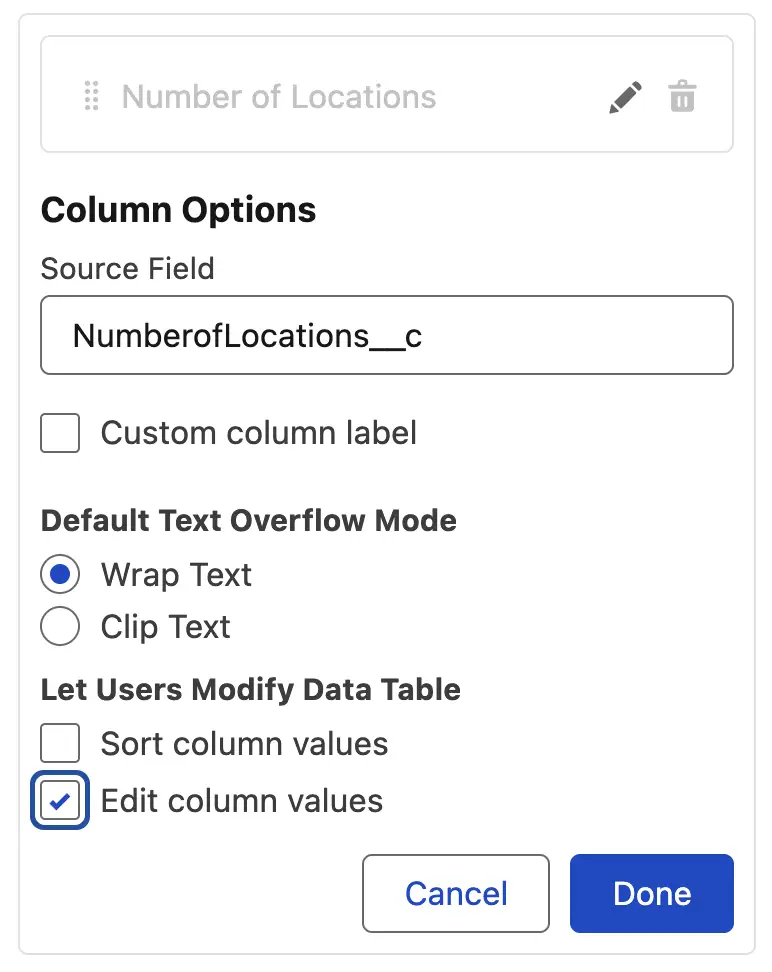
After many minor enhancements over the years, Spring ‘26 finally saw the ability for the native Data Table component to be more than just a read-only component. When configuring columns (of certain types), you can choose to make them editable column-by-column. By enabling this, users can make changes inside the table that you can handle after they navigate past that page.
Summer ‘26 takes this a step further by granting additional powers to relationship fields. Instead of just showing the related record Id, you can now choose to display the name of the related record. You can also choose to turn that cell into a link so the user can click to open the record.
Putting the Data Table component to use is also a breeze – when building your screen elements, you simply drag and drop it onto the canvas, and configure the component’s properties in the side panel. Once you know what you are doing, it only takes a few minutes to fully configure a basic data table component for your screen flows.
Perhaps the biggest drawback of the out-of-the-box component is its lack of functionality – the Data Table component supports the ability to display records in a table, sort by the displayed columns, a search bar that you can use to search for specific records that are displayed within the table, and now the ability to edit some data types.
While you can finally enable the ability to edit certain columns in the component, the data types that you can offer for editing are extremely limited. For example, if you wanted users to be able to move between Lead Statuses, you cannot. This is a restriction on picklist fields, as these cannot be made editable yet.
UnofficialSF Datatable LWC
The custom datatable LWC (Lightning Web Component) that UnofficialSF has on offer was likely the first one that many Flow builders used, as it was built fairly early on and was the most comprehensive option available. Before the Salesforce component was released, this was the popular option for displaying records in a data table in a screen flow.
As well as offering similar features to the out-of-the-box Data Table component, the UnofficialSF option offers the ability to add new rows, edit existing rows, and store the state of your records both before and after they’ve been displayed on the page.
For example, if you have a list of five contact records related to an account being displayed and you make changes to the email domain (say they’ve gone through acquisition so their email domain is changing), and you also add a new line for a new IT Manager, then you would have both the before values (the five Contact records with the original email domains) in one collection, as well as a second collection with the after values (all six contacts with the new domains).
This flexibility alone means that a large number of Salesforce professionals may still choose to install the UnofficialSF Flow Data Table component package as opposed to just using the out-of-the-box component. There’s certainly a lot more that it offers over the core offering!
OnDuty Enhanced Datatable
The OnDuty Datatable component is another popular third-party offering from the wider Salesforce community, namely Pablo Martinez. Similar to the UnofficialSF component, the OnDuty Datatable must be installed from outside of the Salesforce AppExchange, this time from GitHub.
Just like the others, you can drag this component onto the canvas to begin configuring it (after deploying it from GitHub). It can be configured to make columns editable, with a lot of flexibility. It also offers the ability to display records in a data table, make changes to those records, and adds some more advanced functionality that some flow builders may find beneficial.
Some of the advanced features that OnDuty Enhanced Datatable offers are custom buttons, a Platform Event listener, and the ability to automatically navigate to different pages in the Flow. This is particularly useful if you want to create “multiplayer Flows” – in other words, if you want a team to be working on the same Screen Flow and have data updated for everyone when an action is done by one team member.
The wonderful thing about the Salesforce platform is that it is designed to work with a developer marketplace – and the great thing about the Salesforce community is that there are so many willing developers who build incredible solutions.
Custom LWC
Last but certainly not least on our list is the option of building your own custom LWC to accomplish whatever niche requirements your business has. Having the ability to design, build, and scale your solution perfectly for your specific needs means that it will be much easier for it to do whatever you need. In terms of functionality and flexibility, it will take the prize.
Unlike the out-of-the-box Flow Data Table component and the two third-party packages, the Custom LWC route means you will need to build it entirely yourself, which will take a significant amount of time and effort. You will also require a programmatic developer with LWC skills who is capable of building out the tool you need.
With this option, you will not only need to consider the maintenance of the Flow product but also the evolutions that come with the Lightning Platform. There may be functions that are deprecated over time that you will need to replace, and there may be new features added that allow you to accomplish a goal more suitably.
Comparison Table
Now that you understand each option a little bit better, you’ll likely have an idea in your head as to which tool will suit your business best. If you’d prefer to see all the options together and compare them, I’ve created a neat little table that should streamline your decision-making by presenting all the options together so you can compare them properly.
| OOTB | UnofficialSF | OnDuty Enhanced Datatable | Custom LWC | |
|---|---|---|---|---|
| OOTB or Not? | Yes! | No, but fairly quick installation. | No, but fairly quick install. | No, needs to be built from the ground up. |
| User-Friendly Setup | 5 | 3 | 3 | 1 |
| Flexibility | 1 | 3 | 4 | 5 |
| Upgradability | 5 | 4 | 4 | 1 |
| Special Requirements | As long as you know Flow, you’re good! | A little bit more experience is required. | Most features require moderate experience, advanced even more so. | LWC Development skills are required. |
| Special Features | Nothing to note, apart from the fact it’s ready to go! | Ability to create and edit rows, use Apex-defined objects. | Editable rows, custom buttons, platform event support, and auto-navigation options. | Complete and total flexibility, whatever you need, you can likely build. |
| Best Fit | For simple, display-only data table requirements. | Great if you need a bit more functionality or the ability to add or edit rows. | Good if you need advanced functionality, but don’t want to build a custom solution. | Perfect if your business needs total flexibility and custom functionality. |
Summary
When selecting a Data Table component for your flows in Salesforce, there’s no single right option that I could recommend, as each business and each set of requirements is different. Additionally, if you select one option for one flow, you don’t need to continue using it with all your other flows!
You may have one super complex flow that requires a custom LWC to be built, another that is used to manage active contacts related to an account that you may choose to use the UnofficialSF or OnDuty tools (as they support the addition of records). Yet, another is just used to display cases on an account. You’re free to do as you choose, but I hope this article has helped to make you more informed about the options available to you.
The post Salesforce Flow Data Table: Standard vs. Custom appeared first on Salesforce Ben.
Popular Products
-
 Classic Oversized Teddy Bear
$23.78 -
 Gem's Ballet Natural Garnet Gemstone ...
$171.56$85.78 -
 Butt Lifting Body Shaper Shorts
$95.56$47.78 -
 Slimming Waist Trainer & Thigh Trimmer
$67.56$33.78 -
 Realistic Fake Poop Prank Toys
$99.56$49.78