Surfshark’s V5.0.0 Mobile Update Has Arrived On Ios - Putting All Your Security Tools In One Place
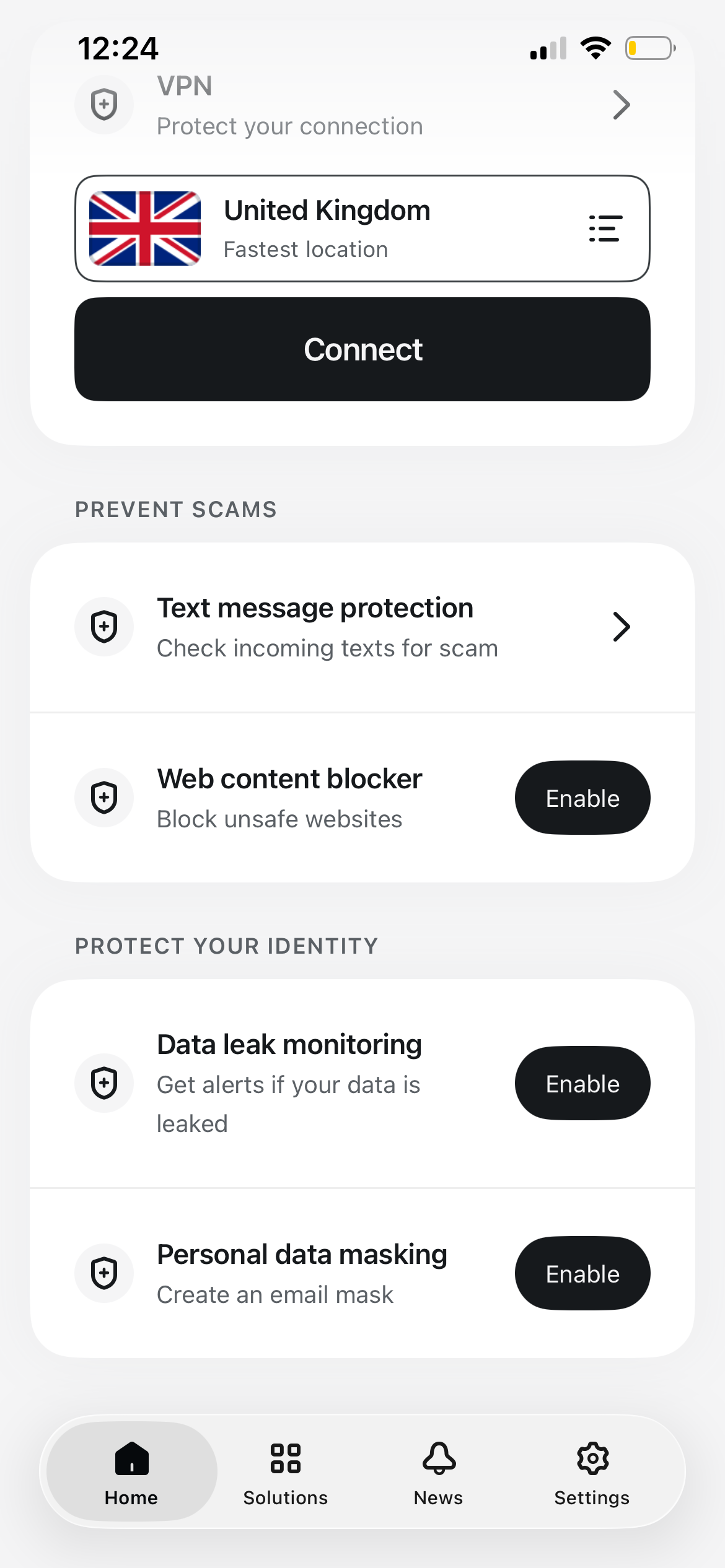
- Surfshark's latest iOS update completely redesigns the home screen, bringing all of Surfshark’s security solutions into a single view.
- Core VPN controls sit alongside built-in scam and identity protections, eliminating the need to hunt through menus.
- Earlier updates introduced the sleek "Liquid Glass" design and standalone features; version 5.0.0 unites them into one cohesive hub.
Surfshark has rolled out version 5.0.0 of its mobile application to iOS, introducing a completely redesigned home screen. The milestone release is the latest step in a deliberate shift for the company, moving from a standalone virtual private network into an all-in-one cybersecurity suite.
For regular users of what we consider to be one of the best VPN services available, interface clarity is essential. While earlier updates laid the groundwork, introducing the smooth "Liquid Glass" aesthetic alongside standalone features like SMS screening, version 5.0.0 finally brings all these tools together in a single, cohesive dashboard.
The goal is simple: eliminate app friction and ensure you can see your security status immediately without digging through sub-menus. Instead of jumping between tabs, the new interface gathers your primary protections on the main screen so you can toggle them on with minimal effort.
A unified mobile security dashboard
The centerpiece of the version 5.0.0 update is a reorganized Home tab that serves as a central command hub for your digital privacy.
According to Surfshark, the aim of the redesign is to let users check their protection status at a glance rather than guessing what is currently running in the background. The primary VPN controls now share the main screen with direct toggles for the provider's wider security tools.
From the unified home view, users can instantly access several built-in protections:
- Text message protection: Designed to screen incoming messages for scam links, protecting against SMS phishing attacks.
- Web content blocker: A built-in filtering tool that prevents unsafe websites and malicious domains from loading on your device.
- Data leak monitoring: Automatically scans for breaches to alert you if your email or sensitive personal details are exposed.
- Personal data masking: Powered by Surfshark's Alternative ID system, allowing you to generate substitute email details for online sign-ups to keep your real inbox private.
The bottom navigation bar keeps things tidy with straightforward access to Home, Solutions, News, and Settings.
For everyday users, this consolidation is a significant quality-of-life upgrade. Rather than treating SMS filters, identity protection, and VPN tunnels as separate products, Surfshark is laying everything out in plain view, turning its mobile app into a genuine, one-stop digital security hub.
On the update, Gabriele Sinkeviciute, Head of Product at Surfshark, said:
"Placing these key solutions for securing connections, preventing scams, and protecting identity on the home screen allows users to stay safe online effortlessly, without navigating multiple settings menus."
This latest iOS update mirrors Surfshark's v3.32 Android update, which rolled out the new design to Android devices in August this year.
Now, with both operating systems sporting the streamlined design, Surfshark's suite of additional tools can expand or be optimized as required, without hampering how quickly a user can access them.
Popular Products
-
 MUCAR BT200 Automotive Full System Di...
$190.99$132.78 -
 Smart Auto-Recharge Robot Vacuum Cleaner
$613.56$306.78 -
 Wireless Security Alarm Sensor for Do...
$40.99$27.78 -
 Remote Control Page Turner & Camera C...
$54.99$37.78 -
 Wireless Rechargeable Selfie Shutter ...
$7.99$4.78