☀️ My Morning Toolkit
After my 7am wake-up alarm, I lean on about 20 morning apps, sites and gadgets for reading, writing, listening, and getting stuff done. I revisit this toolkit every year. Here's what's stayed, what's changed, and what's new.
????️ 7:00 am Wake up and prepare for the day
⏰ Peakeep “Invisible” Alarm Clock
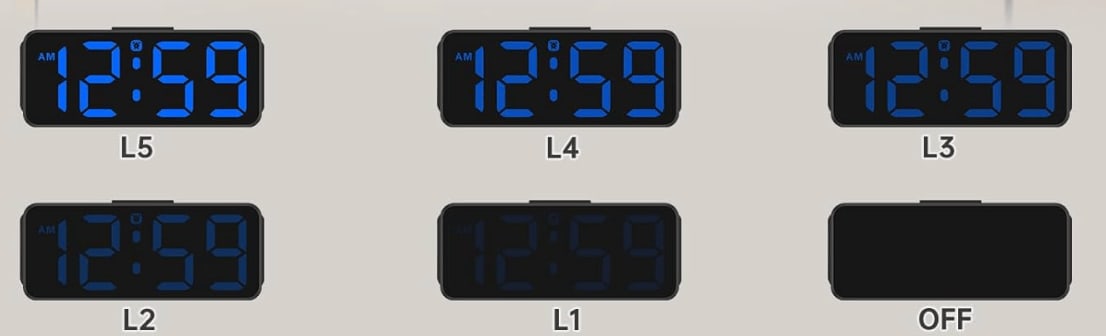
This $14 bedside clock wakes me up. I set its brightness at zero to keep the bedroom dark at night. I tap the top to check the time if I need to. I bought the clock when I decided to store my phone in another room so it doesn’t suck me in before bed.
⭕️ Oura Ring
For the past five years I’ve worn an Oura ring to keep track of my exercise, sleep, and heart rate volatility. I like that, unlike an Apple or Google Watch, it has no distracting screen or notifications.
I ran a two-week experiment pairing the Oura with a Stelo glucose biosensor to see how my diet impacts my sleep, fitness, and energy levels. I can export my data and query it with AI assistants. Or I use Oura’s own AI chat to ask things like “How is my evening snacking affecting the quality of my sleep?”
In the morning I check my sleep quality and resilience scores to calibrate my expectations for the day. Having an objective measure of how well I’ve slept helps me decide whether to push my meager exercise regimen a bit or take it easy. It also helps motivate me on dreary days, and signals when I’m getting sick before I notice.
(Read my original Oura 2020 post. Note: I’ve bought my own Oura rings — no affiliation).
???? Brain Games and ???? Music
A breakfast ritual: playing the NYTimes’ Spelling Bee, Wordle, and Connections with my wife and daughters while listening to our favorite classical music host, Jeff Spurgeon, on WQXR. We talk about the music and what’s ahead at school or work, avoiding stressful headlines.
Quick tip: We listen on our old Google Home Mini kitchen smart speaker. A quick voice command pulls up just about any radio station in the world. (I saw the newer Google Nest Mini on sale this week for $19).
Sponsored Message
Access the World’s Best Ideas
I love reading. But no matter how much I read, I can’t keep up with all the great books I hear about.
That’s why I’ve been relying on Shortform for the past several years to help catch up with books I’m curious about but haven’t had time to read. I also use Shortform to remember key points from books I read years ago. I like the biography section, where I’ve learned about the lives of Malala, Bono, and Leonardo da Vinci.
While a lot of summary apps I’ve tried have 5-min, AI-generated, surface-level book overviews, Shortform’s writers and editors produce in-depth coverage of nonfiction titles.
I also like the business section, which has detailed guides for classic titles and new books I’m curious about like Two Awesome Hours by Josh Davis. In addition to an expert-written overview of key points, with examples, excerpts, and references to related books, you get a one-page summary and contrasting ideas from other authors. Now Shortform has podcast and article guides as well. Wonder Tools readers get a discount. Try it free to explore.
Enjoy a free trial and $50 off the annual plan.
????????8:00 Walk My Daughter to School ????
No tools or tech.
???? 8:25 Commute
I use Snipd to listen to podcasts on the way to work. Here’s my full take. I also rely on Readwise Reader to catch up on articles I’ve saved. It works offline on the subway. Here’s why it’s worth trying. I use Superhuman to check work email.
???? 8:50 Plan the Day
When I get to work, I map out what's ahead with a mix of paper and apps.
???? Google Calendar I check GCal for meetings. I‘ve tried other calendars, including Vimcal, Akiflow, Fantastical, and Notion Calendar. They each have useful features, but I tend to return to the free GCal out of habit. It’s reliable, simple, and lets me easily see shared calendars.
✅ Apple Reminders I keep three priority tasks at the top of my list. I add to that tier only when I’ve completed one. I have a menu of other tasks and reminders in a “Soon” list. I adopted that tactic from ’s great book, Four Thousand Weeks.
???? Remarkable Paper Pro Move I use this paper tablet — or a notebook — to timebox my day. I map the hours based on priorities, energy level, and scheduled meetings. Having a detailed plan helps me avoid decision fatigue later. When I inevitably lose focus, the plan pulls me back on track.
✍️ 9:00 Writing
I start creative work early, when my focus is freshest.
Letterly I dictate my thoughts into this app. That helps me get ideas flowing, and I get a bulleted summary or outline to build on. When I want an AI assistant to challenge my ideas, I use ChatGPT’s Advanced Voice Mode or Gemini Live.
Letterly and other apps like it (AudioPen) are great for what I call bionic dictation— using AI to structure raw speech into a clean outline or summary.
Free alternatives: You can use Apple Notes for dictation on iOS or Mac, or a variety of Google apps if you’re on Android or a Chromebook.
Google Docs / iA Writer I like both of these reliable blank canvases with minimal friction. (Read my take on what’s new in GDocs and why I like iA Writer). I’m also exploring new writing apps like Versey, a minimalist editor with thoughtful AI features.
Raycast Without switching apps, I type [control-space] to open a floating Raycast window. I can then quickly add something to my reminder list or calendar, check a thesaurus, calculate something, or do other tasks. That helps maintain my writing flow. (Why Raycast is a hidden gem).
Headspace Focus music without lyrics helps me block out noise around my Times Square office.
???? 10:00 Email Sprint
Superhuman I use keyboard shortcuts to move quickly through 80 morning messages. To help me keep track of replies I’m waiting for, Superhuman lets me attach automated reminders to resurface messages weeks later. Boomerang is a good alternative for follow-ups if you use Outlook or Gmail.
Flow Dictating messages saves my hands from typing fatigue. It’s remarkably accurate and plugs text directly into whatever app I’m using.
⏸️ 10:55 Break
Wakeout This app features short video loops of real people doing stretching and cardio moves. I can imitate their movements for one-minute exercises. These body breaks improve my focus.
???? 11:00 Research
Perplexity provides thorough, citation-backed search results powered by AI models that understand my detailed queries. The summary saves me from digging through hundreds of raw links. (My Perplexity update).
Claude Projects & NotebookLM These AI tools help me find common themes, key ideas, and examples in prior materials I’ve created, so I can build on my own past work. (More on Claude Projects & my guide to NotebookLM).
That's a glimpse into my morning toolkit. In a follow-up I’ll share tools I use from late morning through bedtime. ????
What tools are YOU using today?
Some links are referral links. In some cases they provide you with a free month of access. If you make a purchase, Wonder Tools may earn a small commission, at no cost to you.
Popular Products
-
 Fake Pregnancy Test
$61.56$30.78 -
 Anti-Slip Safety Handle for Elderly S...
$57.56$28.78 -
 Toe Corrector Orthotics
$41.56$20.78 -
 Waterproof Trauma Medical First Aid Kit
$169.56$84.78 -
 Rescue Zip Stitch Kit
$109.56$54.78